The principle goal of education is to create men and women who are capable of doing new things, not simply repeating what other generations have done. Jean Piaget

Tuesday, August 28, 2012

SparkleFish and StoryLines

This week in Technology students are using two new apps to work on English and Grammar.

SparkleFish:


SparkleFish allows students to build stories using their own voices. Students select a story to build then answer questions about their stories by using the built in microphone.

StoryLines:


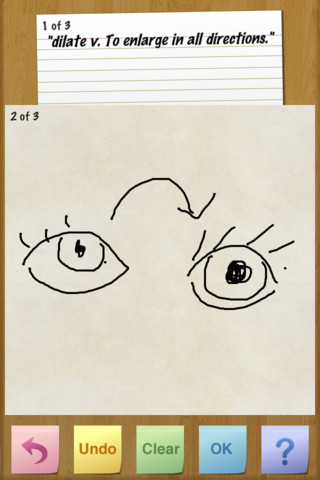
StoryLines allows students to work in groups to create a "Story Line". Each student selects a vocabulary word or quote to begin a StoryLine. Then the student passes the iPad to the next student who then illustrates the word or quote. The iPad is then passed to the next student who has to title the StoryLine and can only use the previous drawing as a reference. This process goes on until the StoryLine starter gets their iPad back. The app then replays every action from the process.

Tuesday, August 21, 2012

Socrative


     This week our students are using the latest quiz/poll/test taking technology through the Socrative App. With this application our students are completing a practice quiz by simply selecting an answer on their iPad. Students are enjoying the new technology and some were even disappointed when the quiz was over. Now how often do we hear students asking for more questions after taking a test?


Saturday, August 4, 2012

Back To School


The Tech Lab and Mr. Beard are ready for the new school year to begin. Prepare your brain for a year of knowledge-cramming tech fun!

Tuesday, April 17, 2012

St. James Features...

Yvette and Shanna's Life in First Grade


Steven Goes to First Grade

Monday, April 9, 2012

Book Reviews

Click on the LINK to check out a few 4th grade book reviews. This one is for Mr. Popper's Penguins.


Wednesday, March 14, 2012

Google Earth

google-earth-5.jpg


3rd-5th grade students used Google Earth this week to learn about Longitude and Latitude. Their task was to enter coordinates into Google Earth and navigate around the location to find hidden objects. A very fun lesson!

Here's a few coordinates to try if you'd like:

  1. 52 15 3 N, 2 15 3 W


  1. 51 22 21 N, 1 50 51 W

  1. 51 22 56 N, 3 20 46 W

Tuesday, March 6, 2012

QR Code Scavenger Hunt

I hid 18 QR Codes around the class and in the "Green Room". Students scanned the QR Codes with their iPads which then released a question I encoded. It is a lot of fun and would be a great way to review material for a test. Check out the video to see how it went.